Local LLM Hardware: What Your GPU or Mac Can Actually Run, and How Fast
Pick your hardware and a model. See if it fits, how many tokens per second to expect, and what that feels like in use.
Fast: feels instant for chat and code completion.
How we calculate (open the math)
Weights. Parameters in billions times bits per weight, divided by 8. Q4_K_M averages about 4.85 bits, so Qwen3 32B (32.8B) needs about 18.5 GB. The exact figure is the size of the GGUF file you download.
KV cache. 2 (keys and values) times layers times KV heads times head size times 2 bytes, per token. Qwen3 32B: 2 x 64 x 8 x 128 x 2 = 256 KB per token, so 8K context is 2.0 GB. Layers and heads come from each model's config file; custom sizes are scaled from an 8B model's 128 KB per token.
Overhead. 1.5 GB for the runtime and compute buffers. Macs give the GPU about two thirds of memory up to 36 GB and three quarters above by default (community-reported; check yours with sysctl iogpu.wired_limit_mb). Sizes are binary GB; bandwidth is decimal GB/s, as vendors publish it.
Speed. Each token reads the active weights and the KV cache once, so the ceiling is bandwidth divided by those bytes. The range is 55 to 85% of the ceiling for dense models and 40 to 75% for mixture-of-experts models. On a graphics card, layers that do not fit spill to system RAM, taken as 64 GB of dual-channel DDR5 at 89.6 GB/s.
How much VRAM do I need to run a local LLM?
Multiply the model's parameters in billions by about 0.6 GB at 4-bit quantization, 1 GB at 8-bit, or 2 GB at 16-bit, then add room for context (the KV cache) and 1-2 GB overhead. An 8B model fits in 8 GB; a 70B model at 4-bit needs about 40-48 GB.
Three numbers decide the fit: the weights, the KV cache that grows with every token of context, and a little runtime overhead. Quantization shrinks the weights; it is the first lever to pull. Below Q4 most models lose noticeable quality, so treat Q3 and Q2 as a way to try a model, not to live with it.
| Quant | Bits / weight | 8B | 32B | 70B | Quality |
|---|---|---|---|---|---|
| FP16 | 16.00 | 15.0 | 61.1 | 131.5 | Reference quality |
| Q8_0 | 8.50 | 7.9 | 32.5 | 69.9 | Indistinguishable from FP16 |
| Q6_K | 6.56 | 6.1 | 25.0 | 53.9 | Near lossless |
| Q5_K_M | 5.70 | 5.3 | 21.8 | 46.8 | Very good |
| Q4_K_M | 4.85 | 4.5 | 18.5 | 39.9 | The usual sweet spot |
| Q3_K_M | 3.90 | 3.6 | 14.9 | 32.1 | Noticeable losses |
| Q2_K | 3.35 | 3.1 | 12.8 | 27.5 | For trying a model only |
Context costs memory too
The KV cache stores keys and values for every token in the window. On Qwen3 32B that is 256 KB per token: 2.0 GB at 8K, 32.0 GB at 128K. Quantizing the cache to 8-bit roughly halves it, which is often the difference between fitting and spilling.
A rough rule of thumb is 1GB of RAM per billion parameters
I can run with 256k context and only uses ~117G
Why does memory bandwidth decide speed?
Generating one token means reading every active weight from memory once. So the speed limit is memory bandwidth divided by the bytes read per token. A used RTX 3090 moves 936 GB/s, a Mac mini M4 about 120 GB/s, which is why the same 32B model runs several times faster on the old card.
| Load into the calculator | ||||
|---|---|---|---|---|
| RTX 5090RTX 5090 | 32.0 GB | 1,792 GB/s | 90 tok/s | |
| RTX Pro 6000RTX Pro 6000 | 96.0 GB | 1,792 GB/s | 90 tok/s | |
| RTX 4090RTX 4090 | 24.0 GB | 1,008 GB/s | 51 tok/s | |
| RTX 3090 (used)RTX 3090 | 24.0 GB | 936 GB/s | 47 tok/s | |
| 2x RTX 30902x RTX 3090 | 48.0 GB | 936 GB/s | 47 tok/s | |
| Mac Studio M3 Ultra, 256 GBM3 Ultra 256 GB | 192 GB | 819 GB/s | 41 tok/s | |
| Mac Studio M1 Ultra, 64 GBM1 Ultra 64 GB | 48.0 GB | 800 GB/s | 40 tok/s | |
| MacBook Pro M4 Max, 64 GBM4 Max 64 GB | 48.0 GB | 546 GB/s | 27 tok/s | |
| RTX 5060 Ti 16 GB5060 Ti 16 GB | 16.0 GB | 448 GB/s | 23 tok/s | |
| MacBook Pro M4 Pro, 48 GBM4 Pro 48 GB | 36.0 GB | 273 GB/s | 14 tok/s | |
| Mac mini M4 Pro, 64 GBM4 Pro 64 GB | 48.0 GB | 273 GB/s | 14 tok/s | |
| DGX Spark, 128 GBDGX Spark | 115 GB | 273 GB/s | 14 tok/s | |
| Strix Halo mini PC, 128 GBStrix Halo 128 GB | 96.0 GB | 256 GB/s | 13 tok/s | |
| Mac mini M4, 32 GBMac mini 32 GB | 21.3 GB | 120 GB/s | 6 tok/s | |
| CPU only, 64 GB DDR5CPU, 64 GB | 51.2 GB | 90 GB/s | 5 tok/s |
you need to read the entire model and KV cache for every token
Even the M3 Max seems to be slower than my 3090 for LLMs that fit onto the 3090
MoE models flip the math. A 120B mixture-of-experts model reads only its 5B active parameters per token, so a big-memory, low-bandwidth box like Strix Halo or a Mac runs it at chat speed while a dense 70B crawls.
Is it worth buying hardware to run LLMs locally?
Only if privacy, offline use or heavy daily volume matter to you. A 16 GB card runs useful small models but feels far behind a $20 subscription. Rent a cloud GPU for a weekend first, measure the model you actually want, then buy for that model's memory and bandwidth.
Some readers should close this tab and keep paying for a subscription. The ones who should buy have a clear reason: data that cannot leave the building, work on a plane, or enough volume that API bills hurt.
it seems really far off from the kind of experience even a basic $20/month subscription gets me
the most cost-effective solution is probably to rent a GPU in the cloud
Best local LLM hardware at each budget
Approximate street prices, as owners report them. Each card loads its setup into the calculator so you can check the model you care about.
One 16 GB card
14B dense models at full speed, and 30B MoE models with a few layers in system RAM.
"First level worth trying, Qwen 3.6 35B A3B with a 16 GB VRAM" jononor, Hacker News
Two used RTX 3090s, 48 GB
70B at 4-bit with short context, or 32B with long context. Plan for two 350 W cards.
"To get 48GB of VRAM you can get 2x 3090s but that is $3k. A single 5090 is $4k but has 32GB" jborak, Hacker News
Strix Halo mini PC, 128 GB
120B MoE models at chat speed. Dense 70B fits but runs slowly.
"I got a Beelink GTR 9 Pro for $1980" anonym29, Hacker News
RTX 5090, or a DGX Spark
32B at 6-bit, fast, on the 5090. The DGX Spark trades speed for 128 GB.
"A single 5090 is $4k but has 32GB" jborak, Hacker News
Mac Studio, 128 GB or more
120B+ MoE models at 8-bit with long context, quietly. Dense 70B works at reading speed.
"the M3 Ultra has 819GB/s memory bandwidth" jmyeet, Hacker News
Is a Mac good for local LLMs?
Yes for capacity: unified memory lets a 64-128 GB Mac load models no single consumer GPU can hold. It is slower per token than a high-end NVIDIA card when the model fits in VRAM, because bandwidth is lower. Pick a Mac for big models, a GPU for speed.
Pick a Mac when
- The model is bigger than 32 GB
- You want silence and about 120 W under load
- MoE models are your daily driver
Pick an NVIDIA GPU when
- The model fits in 24 to 32 GB
- Speed matters more than size
- You want vLLM, CUDA tools or fine-tuning
macOS lets the GPU use only part of unified memory by default. You can raise the limit until the next reboot; leave 8 GB or more for the system.
$ sudo sysctl iogpu.wired_limit_mb=57344 I get about 45-55 tokens per second with this setup
Worked examples
A 32B model on a used RTX 3090
The default above. It fits with 2.0 GB to spare at 8K context. At 16K the KV cache doubles to 4.0 GB, the total passes the card's 24.0 GB and layers spill into system RAM, unless you quantize the KV cache to 8-bit (22.1 GB in total).
Our estimate: 18.5 GB weights + 2.0 GB KV + 1.5 GB overhead = 22.0 GB of 24.0 GB. 25 to 38 tok/s.
70B on a 64 GB Mac
Llama 3.3 70B at Q4 needs about 44 GB, close to the 48 GB default GPU share of a 64 GB MacBook Pro. It runs, at reading speed rather than chat speed.
Our estimate: 39.9 GB weights + 2.5 GB KV + 1.5 GB overhead = 43.9 GB of 48.0 GB. 7 to 11 tok/s.
120B MoE on Strix Halo
gpt-oss-120b reads only 5.1B active parameters per token, so a 256 GB/s mini PC keeps up. Dense 70B on the same box would crawl at about 3.2 to 4.9 tokens per second.
Our estimate: 65.9 GB weights + 0.3 GB KV + 1.5 GB overhead = 67.7 GB of 96.0 GB. 32 to 59 tok/s.
A 30B MoE on a 16 GB card
It does not fit in VRAM, and that is fine: with only 3.3B active, the 3.5 GB that spills to system RAM costs far less than it would on a dense model.
Our estimate: 17.2 GB weights + 0.8 GB KV + 1.5 GB overhead = 19.5 GB of 16.0 GB. 45 to 78 tok/s.
Calibration: our estimate against owner reports
Owners have published their own speeds for these machines. Where their exact model is not one of our presets, we estimate with a preset of the same size and layout, named under each setup.
| Setup | Our estimate | Reported by owner |
|---|---|---|
| Mac mini M4 Pro 64 GB, a 27B dense modelEstimated with Gemma 3 27B Q4_K_M | 9 to 14 | 12 to 15donmcronald, Hacker News |
| Mac Studio M2 Ultra 128 GB, Llama 2 70B Q6_K, llama.cppEstimated with Llama 3.3 70B Q6_K | 7 to 11 | 7.7vczf, Hacker News |
16GB for the weights at Q4
Setups people actually run
Real rigs from their owners' own write-ups and comments. Load one to see what our math predicts for a typical model on that machine.
every pass of agentic cleanup over the OpenStreetMap extract I use for my geocoder cost me around $400 in API spendJonathon Ready · jonready.com
I get about 45-55 tokens per second with this setupnozzlegear · Hacker News
Strix Halo you can get at least 120 GB to the GPUthe_pwner224 · Hacker News
you can get then for about $700, and they're dang goodswalsh · Hacker News
makes 128 GiB of memory feel incredibly tightlambda · Hacker News
it's borderline with 3.5-27Bdonmcronald · Hacker News
What does it cost to run?
Electricity is rarely the problem: a 350 W card answering 1,000 questions spends cents to tens of cents. The real cost is the hardware. Divide what you paid by what you save per answer against an API, and you get how many answers it takes to break even.
The power consumption spikes by about 120 watts over idle
Software that changes the numbers
The same model and machine can fit or fail depending on the runtime's defaults. What each one does with memory:
| Runtime | What changes the memory math |
|---|---|
| Ollama | Its default context window can be shorter than the model allows, and longer prompts get cut. Set num_ctx (or OLLAMA_CONTEXT_LENGTH) to what you need. |
| llama.cpp | -ngl sets how many layers sit on the GPU; -ctk q8_0 -ctv q8_0 halves the KV cache. |
| LM Studio | Shows the GPU offload and context sliders per model before loading. |
| MLX | Apple's native runtime; often faster than GGUF on the same Mac. |
| vLLM | Built for many users at once; reserves 90% of VRAM up front by default (--gpu-memory-utilization). |
$ llama-server -m qwen3-32b-q4_k_m.gguf -ngl 99 -c 32768 -ctk q8_0 -ctv q8_0 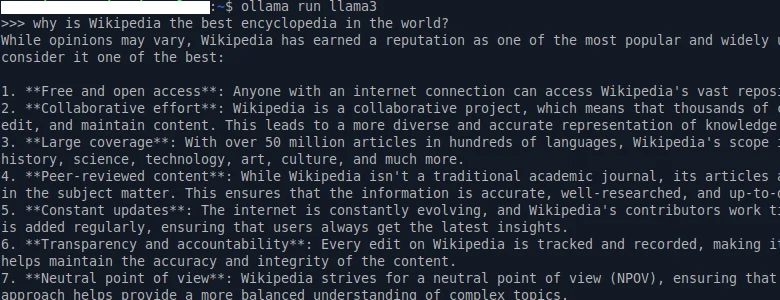
ollama run and a chat prompt. Screenshot: MGeog2022 on Wikimedia Commons, CC BY 4.0.
Use your local model in your tools
Most runtimes serve an OpenAI-compatible API on localhost. Some editors only call cloud URLs, so they need a tunnel to reach your machine. Claude Code talks to an Anthropic-compatible endpoint, so a local model needs a translating proxy in between; install Claude Code first, then point ANTHROPIC_BASE_URL at the proxy.
setting up local llm in cursor is pain because they don't support local host
Questions people ask
Can I run a local LLM without a GPU?
Yes, from system RAM. Dual-channel DDR5-5600 moves about 90 GB/s, so an 8B model at Q4 runs at roughly 7 to 13 tokens per second by our estimate: readable for chat, slow for code.
How much RAM do I need for Ollama?
The model file plus the context plus 1-2 GB. An 8B model at Q4 is about a 4.5 GB file, so 8 GB of RAM is the floor and 16 GB is comfortable.
Is a used RTX 3090 still worth it?
For most people starting out, yes: 24 GB at 936 GB/s is the cheapest way to run 32B models fast. Check the fans and thermal pads before you buy.
Mac Studio or 2x RTX 3090?
Two 3090s are faster on anything that fits in 48 GB. A Mac Studio holds far bigger models, quietly, at lower speed. Decide by the largest model you need.
Does context length use VRAM?
Yes. The KV cache grows with every token. Qwen3 32B uses 256 KB per token: 2.0 GB at 8K, 32.0 GB at 128K.
What is the difference between total and active parameters?
A mixture-of-experts model stores all its parameters but uses only a few experts per token. Total parameters set the memory you need; active parameters set the speed.
Can I combine two GPUs?
Yes. Splitting layers across cards adds capacity, not speed. Tensor parallel runtimes such as vLLM can add speed, at the cost of more setup.
How fast is fast enough for coding?
About 10 tokens per second reads comfortably in chat. Coding agents write long files and loop many times, so aim for 30 or more.
Install Claude Code
One command for your exact system, then a finder that matches any install error to its fix.